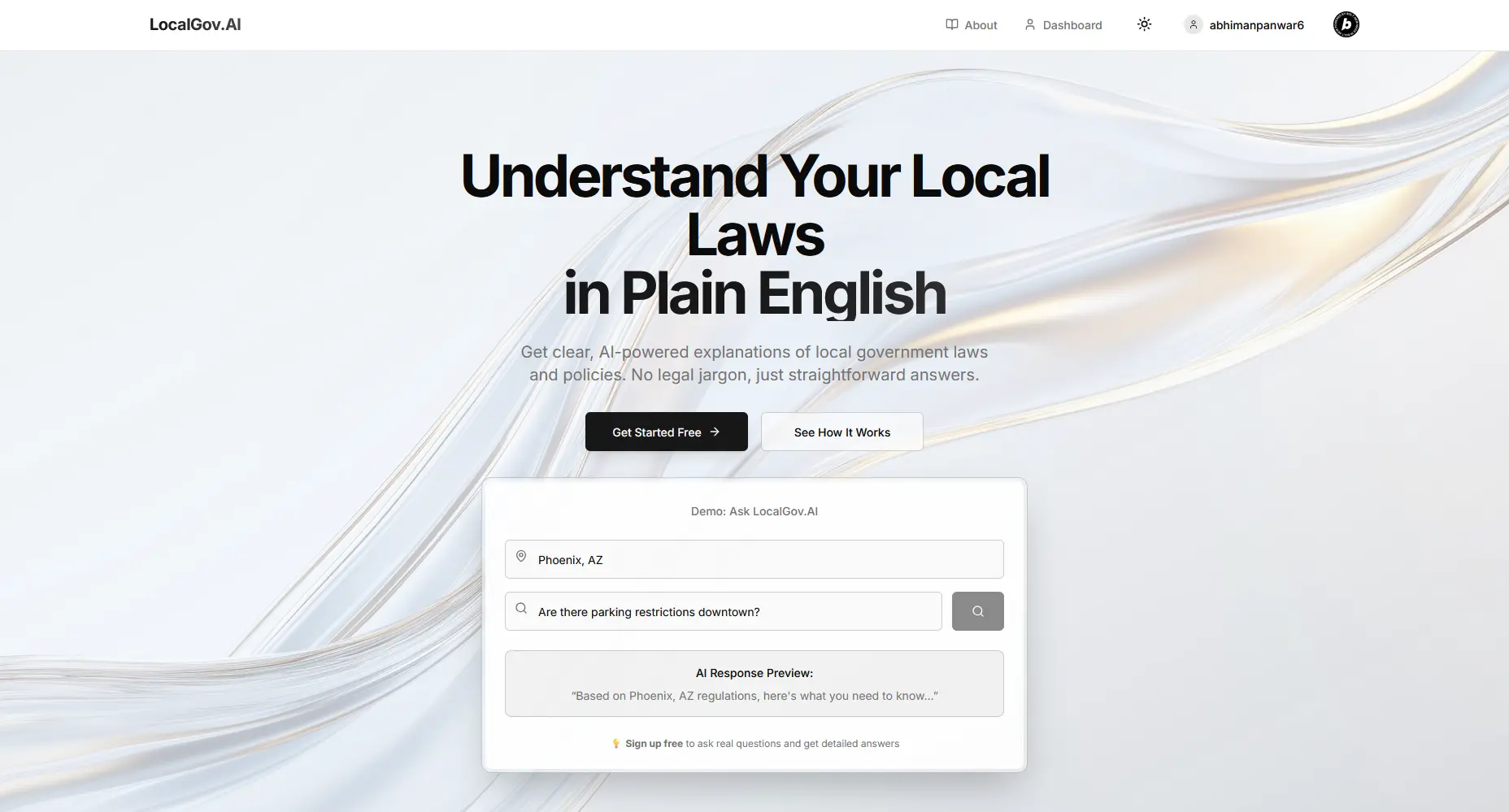
Building LocalGov.AI: Streaming Plain-English Law
How I built a civic-tech platform that turns dense legal language into plain English with Google Gemini, Server-Sent Events streaming, and a smart TTL cache that makes repeat queries 95% faster.
Most people have tried to read a local ordinance at some point and just given up. The text is dense, the structure is alien, and the words are written for lawyers, not residents. LocalGov.AI is my attempt to fix that. It's a civic-technology platform that lets anyone ask a plain-language question about local laws, ordinances, and policies, then get back a plain-English explanation streamed in real time. Under the hood it leans on Google Gemini 2.0 Flash, location-aware prompting across 500+ cities, and a caching layer that makes repeated questions feel instant.
This is the story of how I built it as a solo full-stack project over two months, plus the engineering decisions that mattered most along the way.
The problem
Government policies and legal documents are written in a register almost nobody outside the profession actually speaks. Legal jargon, nested clauses, and cross-references make even simple rules hard to parse. The result is a real barrier between people and the laws that govern their daily lives, things like parking rules, zoning, permits, tenant rights. If you can't understand the rule, you can't follow it or push back on it.
The core idea behind LocalGov.AI is narrow and concrete. Take that complex legal text and translate it into language a regular person can read, with the context of where they actually live. Google Gemini 2.0 Flash does the heavy lifting of breaking the text down, and location-specific intelligence makes the answer relevant instead of generic.
Streaming responses with SSE
The first thing I knew I wanted was for the answer to feel alive. Waiting on a spinner while a model thinks is a miserable experience, especially for longer explanations. So instead of blocking until the full response was ready, I built a custom /api/search endpoint around Server-Sent Events (SSE).
The endpoint uses async generators to stream the AI response character by character, so text starts appearing on screen almost immediately instead of arriving in one delayed block. That char-by-char delivery is what gives the product its sense of responsiveness. You watch the explanation get written out, which reduces perceived latency and keeps the user oriented.
Streaming is the easy part to demo and the hard part to get right. The endpoint handles connection management and error handling so a dropped or failing stream doesn't leave the client hanging. As the response streams, it also accumulates automatically so the full text can be stored once the stream completes. That turns out to matter for both history and caching.
The smart cache
Streaming makes the first answer feel fast. The cache makes the second answer feel free.
People ask overlapping questions. The same query about the same city comes up again and again, and re-running it through the model every time wastes both latency and cost. So I wrote a custom ResponseCache class backed by simple Map-based storage. Each entry lives under a cache key generated from the combination of the query and the location, which keeps "noise rules in Austin" distinct from the same question asked about another city.
Entries carry a time-to-live (TTL) of one hour, so answers stay fresh without going stale indefinitely. A background cleanup process runs every 10 minutes to evict expired entries and keep memory in check, rather than letting the Map grow unbounded.
The detail I'm most happy with is how cached results are served. Rather than returning a cached answer as a plain blob, the cache returns it as a stream too. So a cached response and a freshly generated one travel down the exact same SSE path. The frontend doesn't need to special-case anything, and the user experience stays consistent either way. The payoff is a 95% performance improvement on repeated queries.
Auth & data
For personalization, I needed users to sign in, see their past searches, and bookmark answers worth keeping. I built authentication on Supabase Auth using a PKCE (Proof Key for Code Exchange) flow, which is the most secure option for client-side apps. It pairs with email verification, an auto-refresh token mechanism, and session persistence in localStorage, with protected routes guarded by middleware session checks.
Behind that sits Supabase's PostgreSQL database with real-time capabilities. The data model is small and intentional: one table for search history and one for bookmarks, both keyed to the authenticated user.
-- Search History Table
CREATE TABLE search_history (
  id UUID DEFAULT gen_random_uuid() PRIMARY KEY,
  user_id UUID REFERENCES auth.users(id) ON DELETE CASCADE,
  query TEXT NOT NULL,
  location TEXT NOT NULL,
  created_at TIMESTAMP WITH TIME ZONE DEFAULT NOW()
);

-- Bookmarks Table
CREATE TABLE bookmarks (
  id UUID DEFAULT gen_random_uuid() PRIMARY KEY,
  user_id UUID REFERENCES auth.users(id) ON DELETE CASCADE,
  title TEXT NOT NULL,
  query TEXT NOT NULL,
  location TEXT NOT NULL,
  content TEXT NOT NULL,
  created_at TIMESTAMP WITH TIME ZONE DEFAULT NOW()
);
Both tables reference auth.users with ON DELETE CASCADE, which matters for the privacy story later. When a user goes, their data goes with them automatically.
It's worth being explicit about which parts of the system live where, because the streaming and caching design only works if the frontend and backend agree on the contract.
| Frontend | Backend & Infrastructure |
|---|---|
| Next.js 14 App Router with React Server Components | Google Gemini 2.0 Flash language model |
| TypeScript in strict mode | Supabase PostgreSQL with real-time updates |
| Tailwind CSS, shadcn/ui + Radix UI | Supabase Auth (PKCE flow) |
| Framer Motion, react-markdown | Server-Sent Events for streaming |
| react-hook-form + Zod, Sonner toasts | Vercel edge deployment with global CDN |
Security & middleware
A public AI endpoint is an open invitation to abuse, so the middleware layer does real work. The most important piece is rate limiting: 30 requests per 60 seconds per IP, with IP tracking based on the x-forwarded-for header. That keeps a single client from hammering the search endpoint, running up model costs, or degrading the service for everyone else.
On top of that, the app sets a Content Security Policy (CSP) to harden against XSS, and relies on Supabase for encryption of data in transit and at rest. The piece I cared most about getting right was deletion. Account removal is GDPR-compliant with cascading data removal, which is exactly where the ON DELETE CASCADE constraints from the schema pay off. Deleting a user cleanly takes their search history and bookmarks with them, with no orphaned rows left behind.
Challenges I ran into
The hard parts of this project clustered around real-time behavior and security. Getting SSE streaming right, with proper connection and error handling, was more involved than wiring up a normal request/response endpoint. Building the smart cache with TTL expiration and background cleanup, then making cached responses behave like live streams, took a few rounds of iteration to get consistent. The PKCE authentication flow demanded care too, since the whole point is security and small mistakes undermine it. And real-time response delivery plus the rate-limiting middleware each had their own edge cases to handle.
What I learned
This build pushed me deep into a set of technologies I'd only touched before. I learned how to integrate the Google Gemini API with context-aware prompting, how Server-Sent Events actually work end to end, and how to lean on Supabase for both authentication and database. I got hands-on experience designing advanced caching strategies with TTL and automatic cleanup, implementing PKCE for secure client-side auth, and designing a PostgreSQL schema with proper foreign-key relationships. Along the way I also got more fluent with the shadcn/ui and Radix UI component system, performance work like code splitting and edge deployment, and the security fundamentals of rate limiting, CSP headers, and GDPR compliance.
Closing
LocalGov.AI set out to do one thing well: make local government understandable to the people it actually governs. Streaming makes it feel immediate, the cache makes it feel fast, and the auth and security layers make it something I'd trust with real users' data. If you want to see it in action, it's live at localgov.kroszborg.co.