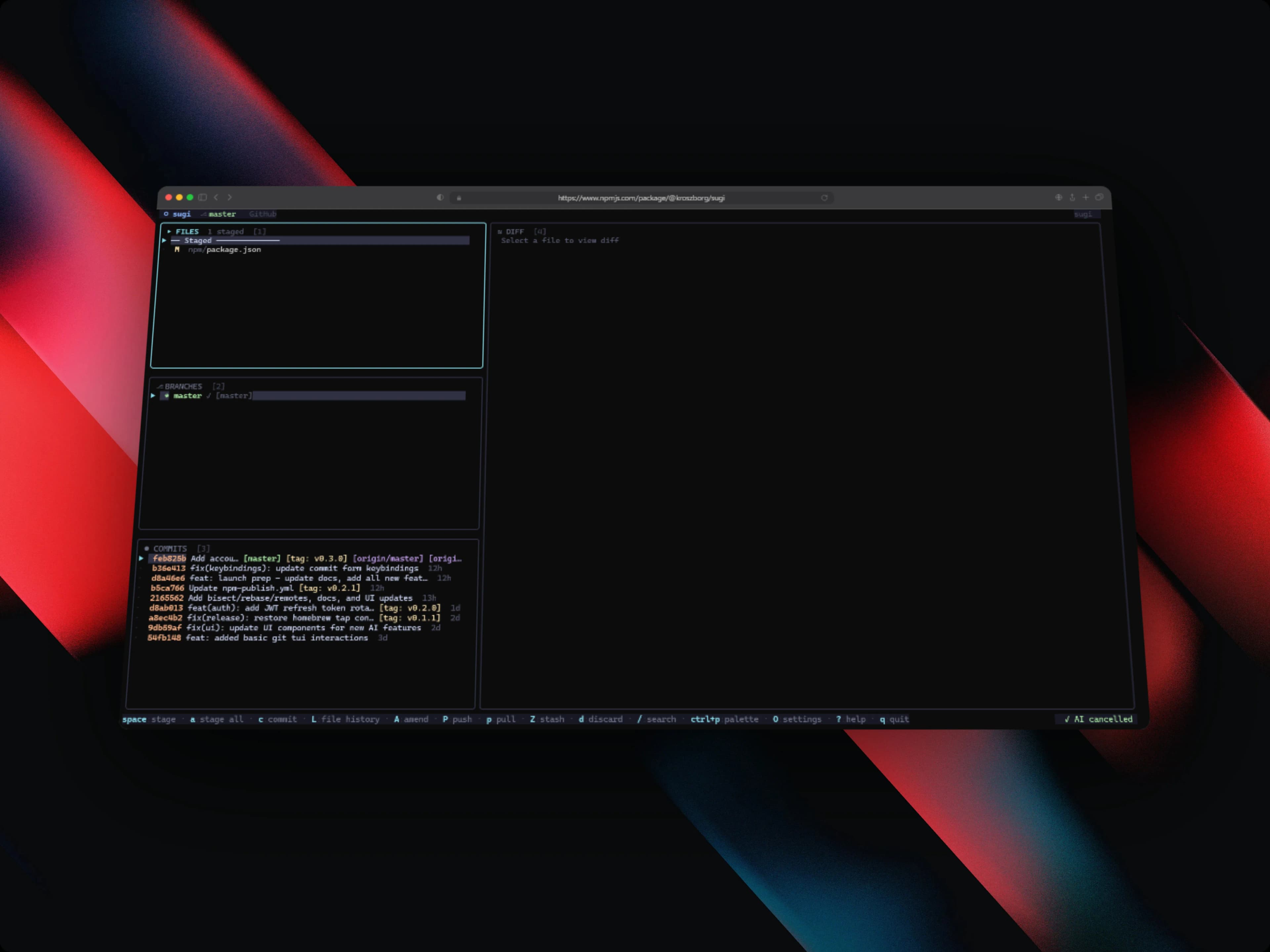
Sugi - Terminal UI Git Client
Feature-rich TUI git client in Go with GitHub/GitLab PR management, AI-powered commit messages, interactive rebase, bisect tools, worktree management, and multi-account support
Timeline
Ongoing
Role
Solo Developer
Team
Solo
Status
CompletedTechnology Stack
Key Challenges
- Building a responsive terminal UI that adapts correctly to different terminal widths and resize events
- Real-time git state synchronization across all panels without blocking the UI
- AI commit message generation using free Groq inference with clean diff context injection
- Implementing interactive rebase with pick/squash/reorder/drop in a keyboard-driven TUI
- Cross-platform binary distribution via npm, Homebrew, and go install simultaneously
Key Learnings
- Idiomatic Go programming: concurrency with goroutines, error wrapping, and interface design
- TUI development with the Charm Bracelet ecosystem: Bubbletea, Bubbles, and Lipgloss
- CLI architecture and hierarchical command routing with Cobra
- GitHub and GitLab REST API integration for PR/MR, CI badges, and review status
- Cross-platform binary packaging and publishing to npm, Homebrew tap, and Go module proxy
Sugi - Terminal UI Git Client
Overview
Sugi (杉, cedar tree, grows fast, stands tall, shaped with precision) is a terminal UI git client written in Go using the Charm Bracelet ecosystem. It pulls a full git workflow (staging, branching, commits, diffs, stash, interactive rebase, PR/MR management, AI commit messages, and multi-account switching) into a single keyboard-driven terminal interface.
It's published as an open-source tool. You can install it via npm, Homebrew, or go install, and it runs on Linux, macOS (Intel and ARM), and Windows.
Install: npm install -g @kroszborg/sugi · GitHub: Kroszborg/sugi
Problem Statement
Most developers use git through a mix of raw CLI commands, IDE integrations, and occasional GUI tools. None of those do everything well in the terminal. git log, git add -p, and git rebase -i each need separate invocations and muscle memory for dozens of flags. Managing GitHub PRs means leaving the terminal entirely. I couldn't find a single terminal-native tool that covered the full git workflow in one place, AI-assisted commits and GitHub/GitLab integration included.
Key Features
Core Git Panels
- Files – Stage and unstage individual files or hunks interactively; full diff preview inline
- Branches – Checkout, create, merge, and rebase branches from the keyboard
- Commits – Full log with ASCII graph, cherry-pick, revert, bisect start/good/bad, and reflog
- Diff – Unified diff view with hunk-level navigation and syntax highlighting
- Stash – List, apply, pop, and drop stashes with inline diff preview
PR/MR Integration
- GitHub Pull Requests and GitLab Merge Requests managed directly in the TUI
- CI badge display (pass/fail/pending) and review status per PR/MR
- Create, view, approve, and manage PRs without leaving the terminal
- Authentication via named token profiles (supports multiple accounts per host)
AI-Powered Commit Messages
- Generates conventional commit messages using Groq AI inference (free, no key required by default)
- Default model:
llama-3.1-8b-instant, fast and accurate for diff summarization - Staged diff is injected as context; output follows conventional commit format
- Fully configurable: swap model, set API key, or disable in
~/.config/sugi/config.json
Multi-Account Management
Named token support for multiple GitHub and GitLab identities:
// ~/.config/sugi/config.json
{
  "accounts": {
    "personal": { "host": "github.com", "token": "ghp_..." },
    "work":     { "host": "github.com", "token": "ghp_..." }
  },
  "ai": {
    "provider": "groq",
    "model": "llama-3.1-8b-instant"
  }
}
You can switch accounts within a session. No re-authentication or shell variable changes needed.
Advanced Git Features
- Interactive Rebase – Full rebase workflow: pick, squash, fixup, reorder, drop, all in the TUI
- Git Bisect – Step through bisect sessions with
good/badmarking and automatic narrowing - File Blame – Line-by-line blame with commit metadata and author info
- Reflog – Browse reflog entries and restore HEAD to any previous state
- Worktree Management – Create, list, switch, and remove git worktrees from the UI
- Remote Management – Add, remove, rename, and fetch remotes
Command Palette
ctrl+popens a fuzzy-search command palette across all available actions- Full keyboard-first navigation, no mouse required anywhere in the interface
- Responsive layout: adapts for narrow terminals under 100 columns with a simplified view
Tech Stack
- Go 1.24.2 – Core language; fast compilation, easy cross-compilation, single binary output
- Bubbletea – Elm-inspired Model-Update-View TUI framework; reactive, composable panels
- Bubbles – Pre-built Bubbletea components: viewport, list, textinput, spinner, progress
- Lipgloss – Declarative terminal layout and styling with ANSI color support
- Cobra – CLI command routing, flag parsing, and help text generation
- Groq AI – Free LLM API for commit message generation (
llama-3.1-8b-instant) - GitHub REST API – PR listing, CI status, review state, and merge operations
- GitLab REST API – MR integration with the same interface as GitHub
Technical Implementation
TUI Architecture
Sugi uses Bubbletea's Elm-inspired Model-Update-View pattern. Each panel (Files, Branches, Commits, Diff, Stash, PRs) is an independent tea.Model with its own Init(), Update(), and View() methods. A root application model owns the active panel, global keybindings, and inter-panel message passing. The Update() function is the single point where all tea.Msg values are dispatched. Git state changes, API responses, AI output, and resize events all flow through it.
Lipgloss handles all layout: panels use lipgloss.Place for alignment and lipgloss.JoinHorizontal/JoinVertical for composing sections. Responsive breakpoints are checked on every tea.WindowSizeMsg and stored in the root model to switch between full and compact layouts.
Git State Management
All git operations run via os/exec wrapping standard git commands. There's no libgit2 binding, which keeps it compatible with any git version and configuration. State is fetched asynchronously using tea.Cmd functions that return tea.Msg values on completion; the UI never blocks waiting for a git operation. A RefreshMsg is dispatched after every write operation (stage, commit, checkout, rebase step) to re-fetch panel state.
AI Integration
When the user requests an AI commit message, the staged diff is collected via git diff --cached, sanitized to remove binary content and diff headers beyond a token limit, and sent to the Groq API using the configured model. The response is streamed back and dropped into the commit message textinput field, where the user can edit before committing. No API key is required by default, since Groq's free tier handles the volume.
Distribution Pipeline
Sugi uses GitHub Actions to build cross-platform binaries on every tagged release:
| Platform | Architecture | Distribution |
|---|---|---|
| Linux | amd64, arm64 | GitHub Release, go install |
| macOS | Intel (amd64) | GitHub Release, Homebrew, go install |
| macOS | Apple Silicon (arm64) | GitHub Release, Homebrew, go install |
| Windows | amd64 | GitHub Release, npm, go install |
The npm package (@kroszborg/sugi) downloads the correct binary for the current platform at install time via a postinstall script. The Homebrew tap (Kroszborg/tap/sugi) provides formula-based installation with auto-updates.
What I Learned
Building Sugi taught me:
- Idiomatic Go: interface composition, error wrapping with
fmt.Errorf("%w", err), goroutine lifecycle management, and context cancellation - Bubbletea's reactive model and how to compose independent panel models without shared mutable state
- How terminal UI layout differs fundamentally from web layout, since everything is character-grid based
- GitHub and GitLab API pagination, rate limiting, and webhook/event patterns for CI status polling
- Cross-platform binary packaging: how npm, Homebrew, and the Go module proxy each have different requirements for the same artifact
- Prompt engineering for diff-aware commit message generation, specifically how to truncate context intelligently to stay within model token limits
Impact
Sugi brings a full git workflow into the terminal without requiring a GUI application or browser tab.
- Published – Available via
npm install -g @kroszborg/sugi,brew install Kroszborg/tap/sugi, andgo install - Cross-platform – Linux, macOS (Intel + ARM), and Windows binaries on every release
- Free AI – Groq-powered commit messages with no API key required
- Zero dependencies – Single static binary; no runtime, no interpreter, no package manager after install
- Full workflow – Staging, committing, branching, rebasing, PR management, and AI all in one place
- Polyglot signal – Demonstrates Go fluency alongside the JavaScript/TypeScript primary stack
Architecture Highlights
- Message-passing concurrency: all async operations (git commands, API calls, AI requests) use Bubbletea's
tea.Cmd→tea.Msgpipeline, so the UI thread never blocks - Single binary distribution: Go's static compilation produces a self-contained executable with no runtime dependencies
- Config-driven AI: the AI provider, model, and API key are fully configurable without code changes, so you can swap Groq for any OpenAI-compatible endpoint
- Panel isolation: each panel has its own model and state; switching panels is a root-model state change, not a component unmount/remount
- Adaptive layout: every
WindowSizeMsgrecalculates all panel dimensions, so Sugi handles terminal resize correctly at all times