Building Sugi: A Terminal Git Client in Go
How I built a keyboard-driven TUI git client with the Charm Bracelet stack: full git workflow, PR/MR management, AI commit messages, and cross-platform single-binary distribution.
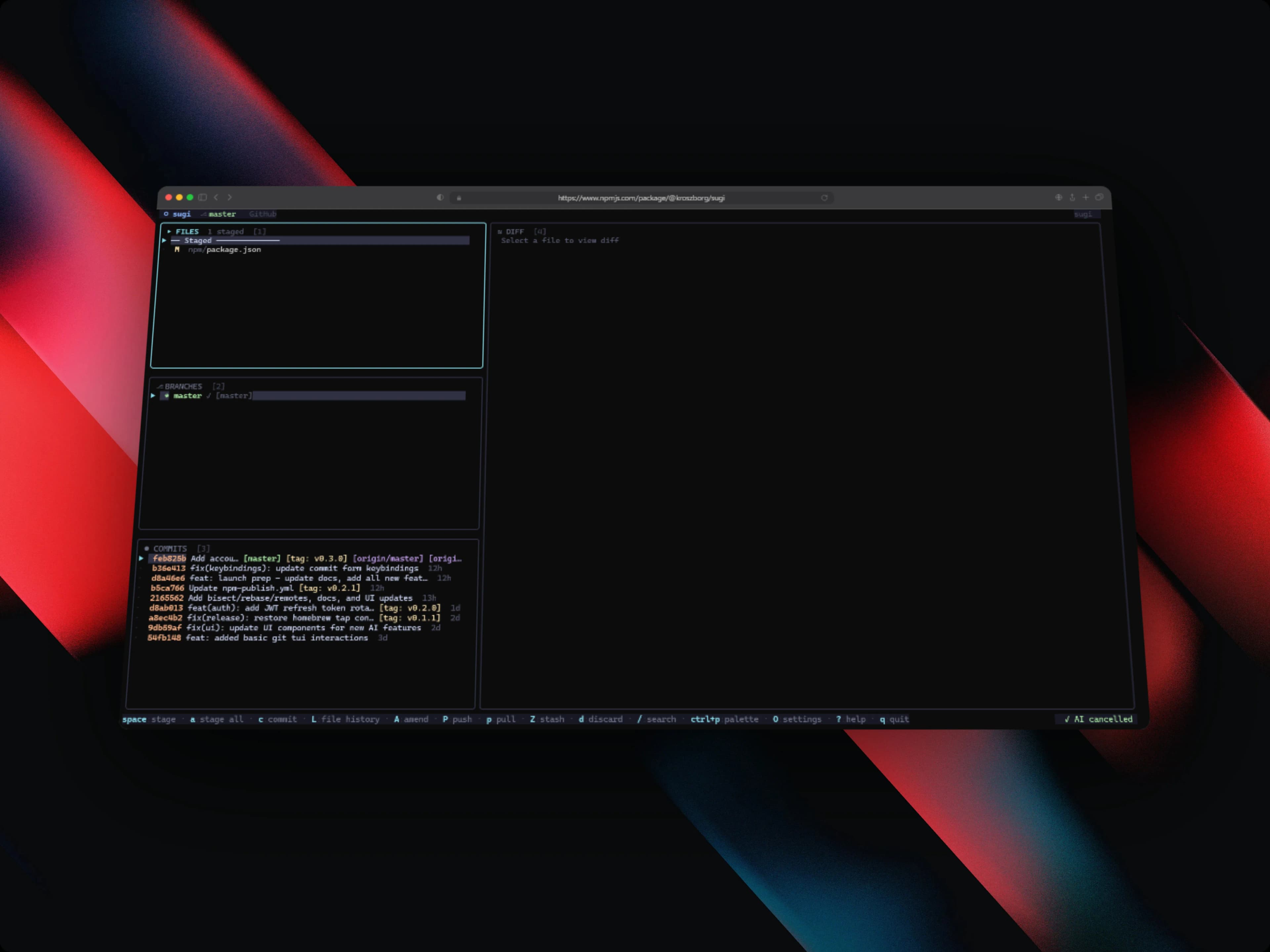
Sugi (杉, the cedar tree: grows fast, stands tall, shaped with precision) is a terminal UI git client I wrote in Go on top of the Charm Bracelet ecosystem. It pulls a full git workflow into a single keyboard-driven terminal interface: staging, branching, commits, diffs, stash, interactive rebase, PR/MR management, AI commit messages, and multi-account switching. It is published open source and you can install it three ways: via npm (npm install -g @kroszborg/sugi), via Homebrew, or via go install. It runs on Linux, macOS (Intel and ARM), and Windows.
This post walks through how it is built. The architecture, how I keep the UI responsive, how the AI commit feature works, and how the whole thing ships as a single binary across every platform.
The problem
Most developers drive git through a mix of raw CLI commands, IDE integrations, and the occasional GUI, and none of those do everything well in the terminal. git log, git add -p, and git rebase -i each need a separate invocation and their own muscle memory for dozens of flags. Managing GitHub pull requests means leaving the terminal entirely for a browser tab. There was no single terminal-native tool that covered the full git workflow in one place, including AI-assisted commits and GitHub/GitLab integration.
Sugi is my answer to that fragmentation. One keyboard-first surface where staging, committing, branching, rebasing, PR review, and AI commit generation all live together.
The TUI architecture
Sugi is built on Bubbletea, which uses an Elm-inspired Model-Update-View pattern. The core idea: all state lives in a model, all change flows through a single Update() function, and the UI is a pure render of the current model via View().
I leaned into that structure by making each panel (Files, Branches, Commits, Diff, Stash, PRs) an independent tea.Model with its own Init(), Update(), and View() methods. A root application model owns the active panel, the global keybindings, and inter-panel message passing. The root's Update() is the single point where every tea.Msg is dispatched. Git state changes, API responses, AI output, and resize events all flow through the same place.
That isolation matters. Each panel has its own model and state, so switching panels is just a root-model state change. There is no component unmount and remount, and no shared mutable state to keep in sync between panels. It keeps each panel's logic self-contained and easy to reason about.
Layout is handled entirely by Lipgloss. Panels use lipgloss.Place for alignment and lipgloss.JoinHorizontal / JoinVertical to compose sections. One thing I had to internalize quickly: terminal UI layout works nothing like web layout. Everything is character-grid based, not box-model based.
Responsive breakpoints
Terminals get resized constantly, and a layout that assumes a wide window falls apart in a narrow one. Sugi checks responsive breakpoints on every tea.WindowSizeMsg and stores the result in the root model, switching between a full layout and a compact one. For terminals under 100 columns it drops to a simplified view. Because every WindowSizeMsg recalculates all panel dimensions, resize is handled correctly at all times rather than only at startup.
Keeping the UI responsive
A git client that freezes while git is working is unusable, so the central constraint was simple: the UI thread never blocks.
All git operations run via os/exec, wrapping the standard git commands directly. I avoided a libgit2 binding on purpose. Shelling out to the user's own git guarantees compatibility with any git version and configuration they already have, instead of pinning behavior to a library.
The trick to staying responsive is Bubbletea's command pipeline. State is fetched asynchronously inside tea.Cmd functions, which run off the UI loop and return a tea.Msg on completion. The UI never sits waiting on a git invocation. It kicks off the command, keeps rendering, and reacts when the message comes back. Every async operation in Sugi (git commands, REST API calls, AI requests) goes through this same tea.Cmd → tea.Msg pipeline.
To keep all panels consistent with the real repository state, I dispatch a RefreshMsg after every write operation (stage, commit, checkout, a rebase step), which re-fetches the affected panel state. The result is that the displayed state always tracks the actual git state without the UI ever blocking to get there.
AI commit messages
One of my favorite features is AI-generated commit messages, and the design goal was that it should just work with no setup.
When you request a message, Sugi collects the staged diff via git diff --cached, then sanitizes it by stripping binary content and diff headers beyond a token limit, so the model gets clean, relevant context rather than noise. That sanitized diff is sent to the Groq API using the configured model. The default is llama-3.1-8b-instant, which is fast and accurate for diff summarization. The response is streamed back and injected straight into the commit message textinput field, where you can edit it before committing. The output follows conventional commit format.
The important part: no API key is required by default. Groq's free tier handles the volume, so the feature works out of the box. It is also fully configurable. You can swap the model, set your own API key, or disable it entirely in ~/.config/sugi/config.json. The same config file holds named token profiles for multiple GitHub and GitLab identities:
// ~/.config/sugi/config.json
{
  "accounts": {
    "personal": { "host": "github.com", "token": "ghp_..." },
    "work":     { "host": "github.com", "token": "ghp_..." }
  },
  "ai": {
    "provider": "groq",
    "model": "llama-3.1-8b-instant"
  }
}
Because the provider, model, and key are all config-driven, you can point the AI layer at any OpenAI-compatible endpoint without touching code.
Distribution
Shipping a TUI to three package managers across three operating systems is its own project. Sugi uses GitHub Actions to build cross-platform binaries on every tagged release:
| Platform | Architecture | Distribution |
|---|---|---|
| Linux | amd64, arm64 | GitHub Release, go install |
| macOS | Intel (amd64) | GitHub Release, Homebrew, go install |
| macOS | Apple Silicon (arm64) | GitHub Release, Homebrew, go install |
| Windows | amd64 | GitHub Release, npm, go install |
Go's static compilation is what makes this tractable. Each build produces a self-contained executable with no runtime, no interpreter, and no package manager required after install. The npm package (@kroszborg/sugi) downloads the correct binary for the current platform at install time through a postinstall script, and the Homebrew tap (Kroszborg/tap/sugi) provides formula-based installation with auto-updates.
Challenges I ran into
A few problems took real effort to get right:
- Building a responsive terminal UI that adapts correctly to different terminal widths and resize events. The character-grid model leaves no room for the forgiving reflow you get on the web.
- Keeping git state synchronized in real time across all panels without ever blocking the UI. This is what drove the
tea.Cmd→tea.MsgandRefreshMsgdesign. - AI commit message generation using free Groq inference with clean diff context injection. Getting the sanitization and truncation right so the model receives useful, in-budget context.
- Implementing interactive rebase (pick, squash, reorder, drop) inside a keyboard-driven TUI rather than the usual
$EDITORflow. - Distributing cross-platform binaries via npm, Homebrew, and
go installat the same time, each with its own packaging expectations for the same artifact.
What I learned
Sugi pushed me deep into idiomatic Go and the Charm stack:
- Idiomatic Go: interface composition, error wrapping with
fmt.Errorf("%w", err), goroutine lifecycle management, and context cancellation. - Bubbletea's reactive model, and specifically how to compose independent panel models without shared mutable state.
- How terminal UI layout differs from web layout, where everything is character-grid based.
- GitHub and GitLab API pagination, rate limiting, and the event patterns behind CI status polling.
- Cross-platform binary packaging: npm, Homebrew, and the Go module proxy each have different requirements for the same artifact.
- Prompt engineering for diff-aware commit messages, chiefly how to truncate context intelligently to stay within model token limits.
Closing
Sugi brings a full git workflow into the terminal without a GUI app or a browser tab. One keyboard-first surface for staging, committing, branching, rebasing, PR management, and AI commits. If you want to try it:
npm install -g @kroszborg/sugiThe source is on GitHub at Kroszborg/sugi.